Short answer Canva is a design tool: you build the logo yourself, from a blank page or one of its logo templates, on the Free plan or on Canva Pro at €12 a month or €110 a year. Logomint is a logo design service: a senior designer from our team creates your logo for a one-off €129, €199 or €299, with first concepts within 48 hours. Canva is enough for a side project, an internal tool, a very early test or a designer who already knows what they’re doing. But Canva says logos made from its templates can’t be registered as a trademark, so if you plan to protect the brand, build it from scratch or have it designed.
Logomint is our own service, so we’ve kept this comparison to facts you can check. Every Canva fact below comes from Canva’s own pages (pricing, content licence and help centre), checked on 15 October 2026, with links at the end.
At a glance
| Canva | Logomint | |
|---|---|---|
| What it is | A design tool you use yourself | A logo design service with its own designers |
| Price | Free, or Pro at €12 a month or €110 a year for one person. Business at €17 a month or €170 a year per person | €129 (Starter), €199 (Growth) or €299 (Premium), one-off |
| Who designs | You, from a template or a blank page | A senior designer from our team. No AI-generated logos |
| Speed | As fast as you can design it | First concepts within 48 hours of your brief, final files within 7 days |
| Changes | You make them yourself | 2 revisions on Starter, unlimited on Growth and Premium, made by your designer |
| Files | JPG, PNG, SVG and PDF. Transparent PNG and SVG need a paid plan | Transparent logo, vector, printable and source files on every plan |
| Trademark | Not with a logo template or stock graphics. Possible with fonts, simple lines and shapes, or your own artwork | You own the whole design once your project is paid and delivered |
Price: free tool or paid subscription vs a one-off fee
Canva showed prices in euros for our location.
- Free: €0, with more than 1.6 million templates and one Brand Kit limited to 3 colours.
- Pro: €12 a month or €110 a year. Canva says only one person can use a Pro account. It adds premium templates and content, AI tools such as background removal, and 5 Brand Kits.
- Business: €17 a month or €170 a year per person, for individuals and small teams, with collaboration tools and 100 Brand Kits.
If you’re wondering about Canva Teams, Canva says it’s no longer available for new sign-ups or upgrades; existing Teams users stay on it unless they switch or cancel.
For a logo, what decides the price is whether you need a transparent background or an SVG file, which Canva’s help centre lists as paid features (see below). So a logo costs nothing if a file with a background will do, and €12 a month or €110 a year on Pro if it won’t. That cost continues for as long as you subscribe, although you get more than a logo for it.
At Logomint, you pay once: €129, €199 or €299, with no subscription. Every plan includes transparent, vector, printable and source files. Premium adds brand guidelines, stationery design, a 3D mockup and a social media kit.
On price alone, Canva is clearly cheaper.
Who designs your logo
With Canva, you do. You can start from one of its logo templates and change the name, colours and fonts, or start from a blank page and build the logo from fonts, lines, shapes and stock graphics in its library.
What Canva doesn’t give you is a second opinion. Nobody reads a brief, asks who your customers are, or tells you that a stock icon and three typefaces will make the logo look generic. Those are the most common reasons a DIY logo ends up looking homemade, as we explain in why does my logo look cheap.
At Logomint, a senior designer from our team creates your logo from your brief. We don’t use AI to generate logos. The trade-off is that you wait up to 48 hours for first concepts rather than starting straight away.
Originality, licences and trademarks
Canva’s Content License Agreement covers everything in its library, including photos, icons, illustrations, fonts and templates. The licences it grants are non-exclusive, and section 9 lists prohibited uses. One of them is using any of its content as part of a “trade-mark, design-mark, trade-name, business name or service mark”, with fonts as the only exception.
Its help centre spells out what that means for logos:
- Logo templates can be customised and used by anyone, so your rights to a logo made from one are non-exclusive and you can’t register it as a trademark.
- Stock graphics, illustrations and photos are licensed non-exclusively too. Other Canva users are free to use the same content, so Canva says it isn’t suitable for a trademark. Elements in a logo need to be exclusive to you.
- A logo you can register is one you design from scratch with Canva’s fonts and simple lines and shapes, or your own original artwork that you upload.
Canva also says it doesn’t sell exclusive rights to a graphic, and suggests contacting a graphic designer instead. To its credit, it says templates suit someone just starting out who isn’t worried about exclusive rights.
On copyright, Canva says that if you create an original design you’re generally its copyright holder, but if you used stock content, your ownership is subject to those third-party rights. If you use its AI image tools, Canva says you own the images as between you and Canva, but that many jurisdictions, including the US, don’t give copyright protection to AI-created works. We cover how copyright and trademark treat these cases differently in can you trademark an AI-generated logo.
At Logomint, your logo is created by a person for your brand, and you own it in full once the project is paid and delivered. Whichever route you take, run a trademark search before you file.
Files you can export
According to Canva’s help centre, you can download a design as JPG, PNG, SVG, PDF Standard (96 dpi) or PDF Print (300 dpi, with bleed, crop marks and an RGB or CMYK colour profile). Transparent PNGs and SVGs, along with quality settings and the CMYK colour profile, are listed as available on Pro, Teams, Education and Nonprofits accounts. Canva’s pricing page says each plan includes everything in the plans below it, so Business has them too.
So on the Free plan, your logo comes with a background, which won’t sit well on photos or a dark website header. EPS and AI files aren’t among the formats Canva lists, in case a printer asks for one. Our guide to which logo file formats you need explains what each format is for.
Every Logomint plan includes a transparent logo, vector, printable and source files, and you own the final logo once your project is paid and delivered.
Edits and revisions
On Canva, every change is yours to make, as often as you like. That suits you if you know what you want, and helps less if you’re not sure why the logo isn’t working.
At Logomint, changes are made by your designer. Starter includes 2 revisions, and Growth and Premium include unlimited revisions. Final files arrive within 7 days.
The two also work well together. Canva’s help centre says you can upload your own logo and use it to make social posts, business cards and flyers, so a designed logo and a Canva account aren’t an either-or choice.
When Canva is the better choice
- It’s a side project or an internal tool, where nobody outside the team will judge the brand.
- It’s a very early test. You want to check an idea before spending money on a brand.
- You’re a designer, or you already know what you’re doing, and you’ll build it from fonts and shapes rather than a template.
- Your budget is zero. A logo with a background on the Free plan costs nothing.
- You’re already paying for Pro for social posts and presentations.
Comparing other ways to get a logo? See Logomint vs Looka for an AI logo maker.
When Logomint is the better choice
- You want a person to design it, working from your brief and your feedback.
- You plan to register the logo as a trademark, and want the whole design to be yours.
- You want transparent, vector, printable and source files without a subscription.
- You want the option of a full refund. You get one before you approve a concept, and within 7 days of approving one as long as the final files haven’t been delivered (refund policy).
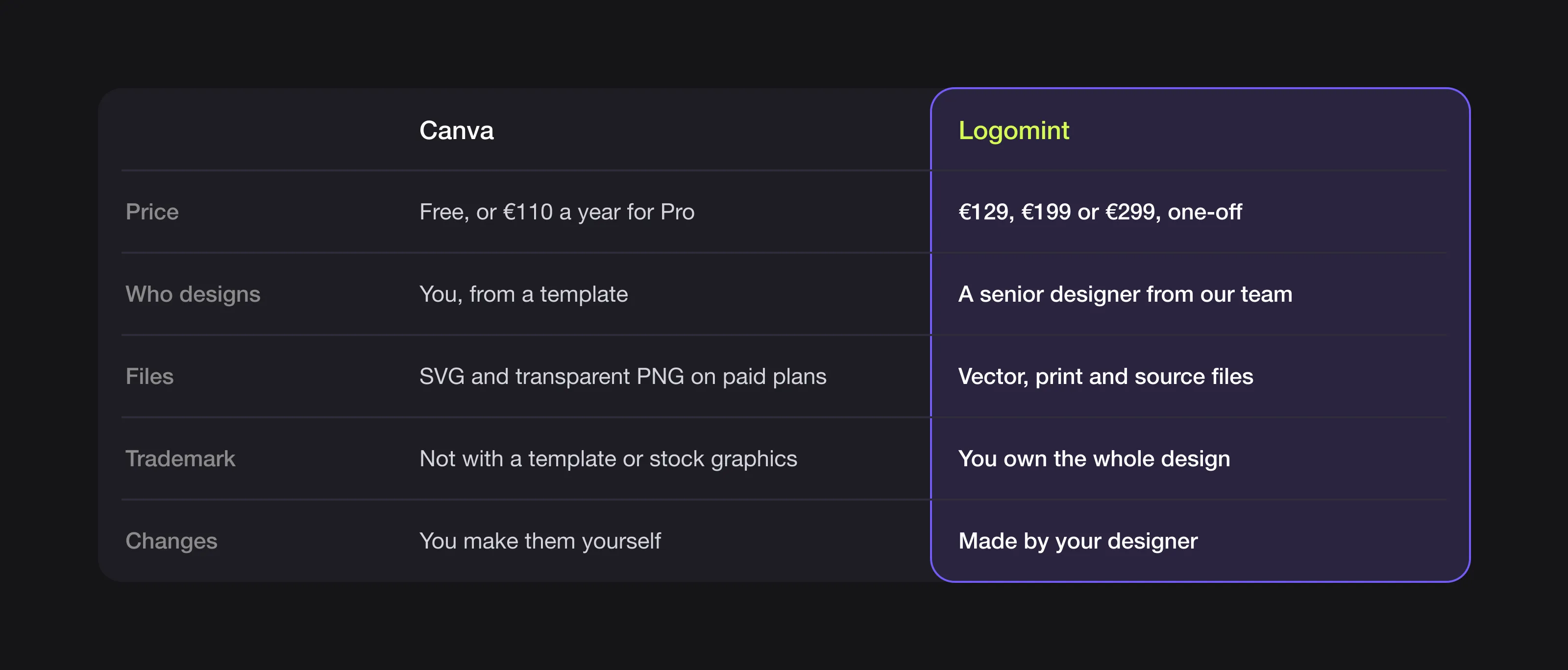 Canva and Logomint at a glance.
FAQ
Can I trademark a logo made in Canva?
Only if it’s built from Canva’s fonts and simple lines and shapes, or from your own uploaded artwork. Canva says logos made from its templates, or containing its stock graphics, illustrations or photos, can’t be registered as a trademark.
Is Canva cheaper than Logomint?
Yes. Canva Free costs nothing and Canva Pro costs €110 a year, compared with a one-off €129 for Logomint’s Starter plan. Transparent PNG and SVG downloads need a paid Canva plan.
Can I download an SVG or transparent logo on Canva Free?
No. Canva’s help centre lists transparent PNGs and SVGs as features of paid accounts such as Pro.
Can I use a Logomint logo in Canva?
Yes. Canva lets you upload your own logo and use it in your designs, and you own your Logomint logo in full once your project is paid and delivered.
Sources
Checked on 15 October 2026. Canva showed prices in euros for our location.
- Canva, Pricing (plans, prices, Pro for one person, Canva Teams FAQ)
- Canva, Content License Agreement (sections 3 and 9)
- Canva help centre, Trademarking logos created on Canva and Thinking of trademarking your logo?
- Canva help centre, Copyright ownership of designs made in Canva
- Canva help centre, Choose the right download file type for your Canva design
Want a logo designed by a person?
At Logomint, a senior designer creates your custom logo from €129, with first concepts in 48 hours, all source files and full ownership once your project is paid and delivered.