Short answer A startup needs four things to look professional: a custom logo, a small colour palette, one or two fonts and a few simple rules for using them. Invest in the logo, use free tools for the rest, and you can build a consistent brand identity for well under €350.
The branding gap is smaller than you think
You see competitors with clean logos, consistent colours and polished social media, and you assume they spent thousands. Some did. But the gap between “no brand” and “professional brand” isn’t €10,000. It’s a few good decisions, a small investment in the right place and the discipline to stay consistent.
What brand identity means for a startup
Forget the 50-page brand book. At the startup stage, your brand identity is four things:
- A professional logo: custom, in vector format, and flexible enough to work from a browser icon to a trade show banner
- A colour palette: two or three colours that work together and suit your personality
- Typography: one or two fonts, used everywhere
- A simple visual system: a few rules for how these elements fit together
That’s your minimum viable brand. Tone of voice guidelines, photography style and illustration can come later.
Not sure where a logo ends and a brand identity begins? We explain the difference in logo vs brand identity.
Step 1: start with the logo
The logo is the anchor. Your colours, fonts and visual direction all follow from it, so it’s the one place where spending money makes the biggest difference.
It’s also where most startups try to save, with a Canva template or an AI generator. That creates a weak foundation, and the costs show up later in reprints and an early rebrand. We break that down in why cheap logos cost more in the long run.
At Logomint, a senior designer creates a custom logo from €129 (Starter: 1 concept, 2 revisions), with first concepts in 48 hours and full source files. Growth at €199 gives you 2 concepts and unlimited revisions. Premium at €299 adds a third concept, brand guidelines, stationery design, a 3D mockup and a social media kit, which covers several of the steps below.
Not sure you need a logo yet? Read do you need a logo before launching.
What works also depends on your industry: our guides for tech startups, consulting firms and travel and mobility apps show the touchpoints and clichés that matter in each.
Step 2: take your colours from the logo
Your designer chose the logo’s colours deliberately, so build on them. Take the primary and secondary colours from your logo and add one neutral, such as a dark grey, for text. That’s your palette.
Write down the exact colour codes (HEX for screens, CMYK for print) and use them everywhere: website, social media, emails and presentations. Consistency is what makes a small brand look established. For more on choosing and combining colours, see how to choose logo colours.
Free tools: Coolors for exploring palettes and checking combinations.
Step 3: pick your fonts
One font for headings and one for body text is plenty. If your logo uses a distinctive typeface, consider it for headings, and pair it with a clean, readable sans-serif for text.
Google Fonts is free, including for commercial use, works on the web and is easy to use in most tools. Inter, DM Sans and Plus Jakarta Sans are solid, modern choices for body text; Sora, Outfit and Manrope have more personality for headings.
Step 4: create a few templates
With your logo, colours and fonts in place, build templates for what you use most:
- Social media: three or four Canva templates for posts and stories in your colours and fonts
- Presentations: a Google Slides or Figma template with your logo and styles
- Email signature: your logo, name and a link, in your brand colours
- Business cards: one layout, if you need them
Templates keep everything consistent without needing a designer for every post.
Step 5: write one page of brand rules
You don’t need a brand book yet. You need a one-page cheat sheet:
- Logo: primary version, icon-only version, minimum size and clear space
- Colours: codes for primary, secondary and neutral
- Fonts: heading and body fonts, and sizes for common uses
- Don’ts: don’t stretch the logo, don’t change the colours, don’t add other fonts
Share it with every freelancer, assistant or teammate who touches your brand. If you choose Logomint’s Premium plan, brand guidelines are included, so this part is done for you.
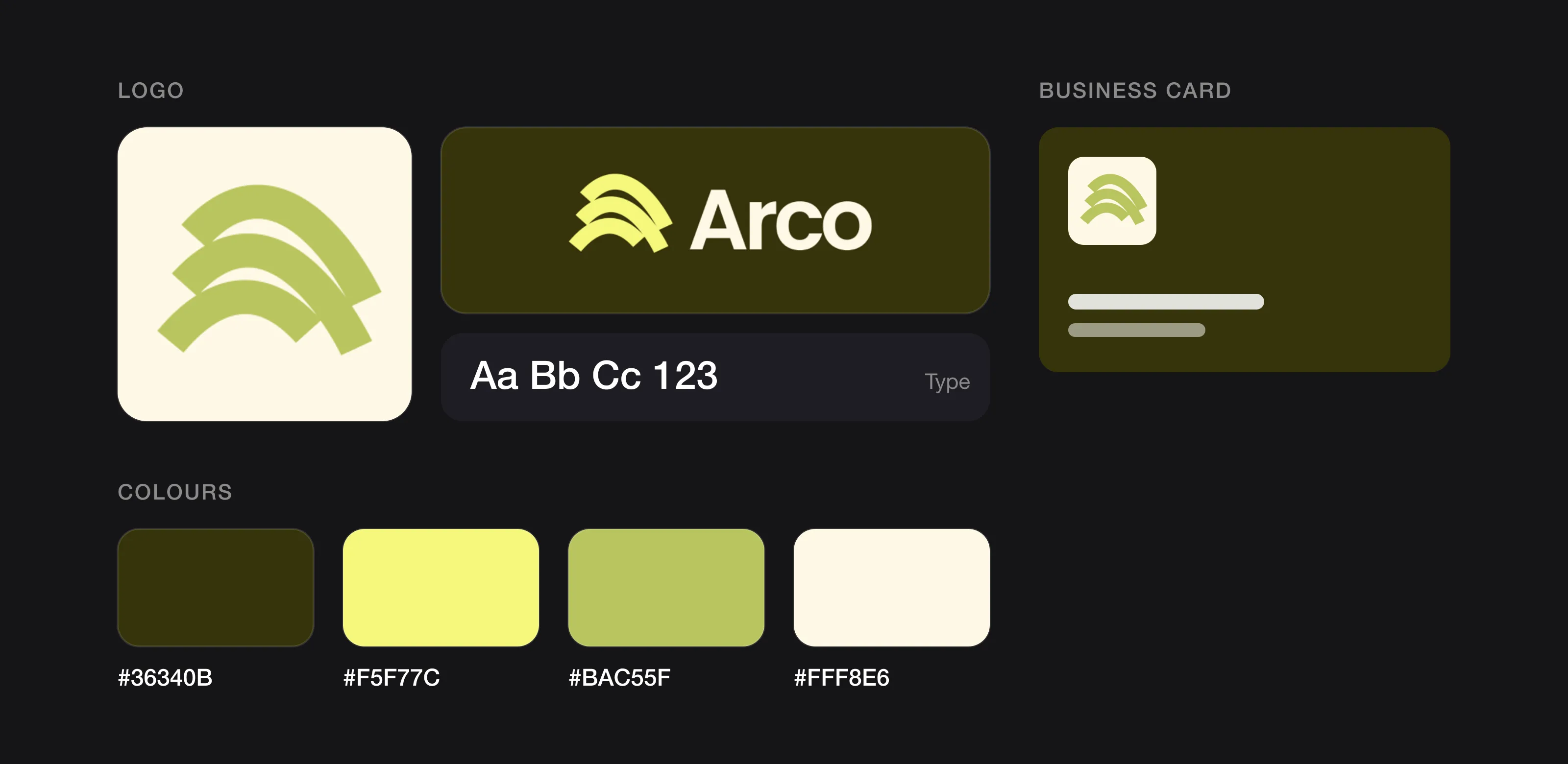 Everything a startup brand needs on one page (Arco, designed by Logomint).
What it all costs
| Item | Cost |
|---|---|
| Custom logo with source files (Logomint) | €129 – €299 |
| Fonts (Google Fonts) | €0 |
| Palette tool (Coolors) | €0 |
| Templates (Canva free plan, or Canva Pro for extra features) | €0 or a monthly subscription |
| One-page brand rules | About 30 minutes of your time |
| Total | Roughly €129 to €350 |
Make sure your logo comes with the right files for everything above; here’s which logo file formats you need.
FAQ
How much does it cost to build a brand identity for a startup?
Roughly €129 to €350. The custom logo is the main cost (€129 to €299 at Logomint), while Google Fonts and Coolors are free and Canva’s free plan covers basic templates.
What should a startup spend money on first when branding?
The logo. Your colours, fonts and visual direction all follow from it, so it’s where spending makes the biggest difference, and free tools can cover the rest.
Do I need a brand book for my startup?
Not yet. A one-page cheat sheet with your logo versions, colour codes, fonts and a few don’ts is enough at the startup stage.
Which free fonts work well for a startup brand?
Google Fonts is free, including for commercial use. Inter, DM Sans and Plus Jakarta Sans are solid choices for body text, and Sora, Outfit and Manrope have more personality for headings.
The bottom line
A professional brand doesn’t need an agency budget. It needs a solid logo, a handful of consistent choices and the discipline to stick to them. Spend on the logo, save on everything else.
If you’re ready to build that foundation, a senior designer at Logomint can create your logo from €129, with first concepts in 48 hours and a 100% money-back guarantee. See the plans.